
🛠 Installation - Documentation Plugin
Buy NowInstalling the Documentation Management Plugin for nopCommerce is a straightforward process that requires just a few minutes of your time. Follow the instructions below to get the plugin up and running in your store.
✅ System Requirements
Before proceeding, make sure your nopCommerce store meets the following requirements:
- nopCommerce Version: Compatible with nopCommerce 4.60, 4.70 and above
- Hosting Environment: Supports all environments where nopCommerce runs (.NET Core compatible)
- Admin Access: Plugin installation must be performed by a user with Administrator privileges
🔒 Pro Tip: Always back up your database and application files before installing any new plugin.
📦 Step-by-Step Installation Instructions
This plugin comes bundled with the NopAdvance.Core plugin, which is a prerequisite for its operation. Please follow the plugin installation instructions on how to install a plugin to proceed with the setup.
Once the plugin has been installed, you will see the plugin menu under NopAdvance > Plugins > Documentation in your nopCommerce admin menu, similar as displayed in the image below.
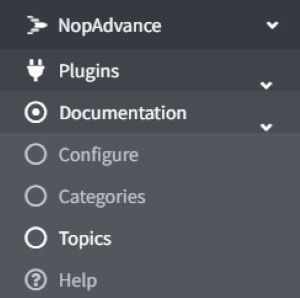
The plugin has 3 menu items:
- Configure: Manage plugin settings.
- Categories: Manage documentation categories for tree navigation.
- Topics: Documentation pages connected with categories.
We’ll see each plugin module in the next chapters.